class: center, middle, inverse, title-slide .title[ # Effective Use of AI/LLMs in R Programming ] .subtitle[ ## <a href="https://eligurarie.github.io/EFB654/">EFB 654: R and Reproducible Research</a> ] .author[ ### Elie Gurarie ] .date[ ### April 6, 2026 ] --- class: inverse # Last week in re. Shiny apps... .pull-left[ .Large[ > *"You will save yourself **A LOT** of time — if you let an LLM (like `Claude.ai`) help you out."* ]] -- .pull-right[  ] --- ## Advantages & Risks .pull-left[ ### Advantages - **Efficiency** — tasks that took hours take minutes - **Multiplicative force** — you direct; AI executes - **Lowers the barrier** to trying fancy stuff, understanding techniques, - **"Rubber Duck** — explaining your problem clarifies the problem - **Much Faster than Googling** - for complex, multi-step coding tasks ] .pull-right[ ### Risks - **Outsourcing understanding** — code you can't explain is code you can't maintain or debug - **Hallucination** — Claude occasionally invents function arguments or packages that don't exist - **Over-engineering** — asked for a hammer, got a Swiss army knife - **Not learning** — copy-paste without engagement stunts development - **Environmental cost** — esp. wrt to energy - **Social costs** - (related: ***Sycophancy***) ] --- class: large ## Core Takeaway > .Large[For R coding, the **advantages outweigh the risks** — *if done correctly*.] .pull-left.large[ AI is a **collaborator**, not a **ghostwriter**. - It can provides rough drafts - It can help refine - It can help check But It **NEVER** provides a final product. ] .pull-right.large[ **Use it for productivity** and **learning**. Understand [the code] it is providing - to make sure its correct - to fix it - to "own"it ] --- class: large, inverse, middle, center # Which Tool To Use? --- ## Choosing the Right Tool .Large[ Use **[Claude.ai](https://claude.ai)** through Syracuse University's institutional access. ] - Better privacy guarantees — **institutional data** not used to train models - STILL: don't paste / upload sensitive, unpublished, or proprietary data into consumer tools - (or - just - don't upload any data) - More capacity | more powerful models - "Free" for you --- ## Multiple Claude Models #### Model choice matters: | Model | Use when... | |---|---| | **Haiku** | Simple, repetitive tasks — reformatting, quick lookups | | **Sonnet** | Almost everything else — this is your default | | **Opus** | Genuinely complex reasoning tasks — rarely needed for R coding | <br><br> > Sonnet will easily handle 95% of R coding tasks. > > Opus is not "better Sonnet" for most purposes — it's slower, costlier, and more likely to over-confidently barge down crazy rabbit-holes. --- class: inverse, middle, center # Environmental Costs --- ## How Much Energy Does This Use? .pull-left[ A rough but useful framework: | Action | Energy | |---|---| | Single query / short response | ~1 Wh | | Generating a markdown / text doc | ~5 Wh | | Generating a Word / PDF / complex doc | ~25 Wh | Model matters too: - **Haiku** → divide by 3 - **Sonnet** → baseline - **Opus** → multiply by 3 ] .pull-right[ To make it tangible: compare to a **1500W space heater** `$$\text{heater seconds} = \frac{\text{energy (Wh)} \times 3600}{1500}$$` So 1 Wh ≈ **2.4 seconds** of space heater. A typical coding session with Claude (10–15 exchanges + a few file generations): ~25 Wh → about **1 minute** of space heater. Or: ~40 minutes powering a laptop screen. ] > Dr. Green has Claude compute this approximate environmental cost at the end of each query. Great idea. --- ## Is It Worth It? .pull-left[ **Compare to the alternative:** A (non-AI) Google session to figure out, e.g., how to add a regression line with R² to a `ggplot` scatter plot: - 4–6 searches - Reading 3–4 Stack Overflow threads - Each Google search ≈ 0.3 Wh - Each page load ≈ 0.5–2 Wh - Total: easily *15 Wh** — *plus potentially HOURS of your time* **Note - it is actually very hard to stop Google from using AI anways when it searches** A single well-formed Claude query: **~1–3 Wh**, answered in seconds. ] .pull-right[ **The environmental math usually favors Claude** — *especially for complex tasks.* <br> The real cost isn't the energy per query. It's **unnecessary queries**: asking Claude to do things you already know, using Opus when Sonnet suffices, regenerating output because the prompt was vague. > **Good prompting = fewer queries = lower footprint.** ] --- class: inverse, middle, center # Best Practices --- .pull-left[ ### Prompt Structure **1. Context** — what you have > *"Here is an R script that plots GDP vs. life expectancy using base R graphics: [paste code]"* **2. Task** — what you want > *"Convert this to ggplot2, preserving: log x-axis, bubble size proportional to population, colors by region, two legends."* **3. Constraints** — how you want it > *"Use named color vectors. Explain each new ggplot layer."* ] .pull-right[ **Avoid:** - Vagueness: *"make it better"* - Asking for too much at once - Not specifying constraints **Personally:** - I don't thank / please Claude.ai, any more than I thank any other fitted linear modeling for providing a forecasting prediction  - Keep queries short - (grammar secondary to content) - Ask it to ask follow-ups - so it doesn't head somewhere crazy. ] --- ## Iterating & Verifying Think of it as **pair programming**, not **outsourcing**: 1. **Start small** — ask for one feature at a time 2. **Run every response** before asking for the next change 3. **Read what it produces** — don't just copy-paste 4. **Version your code** — before each Claude edit, save `app_v1.R`, `app_v2.R`, etc. 5. **Ask it to explain** — *"explain what the `scale_size_area()` call is doing"* 6. **Push back** — *"that introduced a bug: [paste error]. Fix only that."* --- ## When Things Break Claude will sometimes produce code that doesn't run. Standard debugging loop: ``` 1. Run the code → get error 2. Paste back to Claude: "Here is the error: [paste]. Here is the current code: [paste]. Fix it." 3. Read the fix — understand what changed 4. Run again ``` **Red flags to watch for:** - Functions or arguments you don't recognize → check with `?functionname` - Claude inventing a package that doesn't exist → `install.packages()` will fail - Code that runs but produces wrong output — harder to catch, requires *you* to know what "correct" looks like .center.red.Large[**You are the quality control.**] --- class: inverse, middle, center # Examples --- ## Example 1: Extending the Old Faithful Shiny App **The setup:** You have `app5.R` — two histogram tabs, color and bin controls. .pull-left-70[ **The prompt:** > Here is a Shiny app [*paste app5.R*]. Add: > > 1. Third tab with a scatter plot of eruptions vs. waiting time, with a fitted regression line and R² value displayed on the plot > > 2. Fourth tab with an interactive DT data table of the raw faithful data > > 3. Download button in the sidebar for the currently active histogram as a PNG > > Explain how / where features added." ] .pull-right-30[  ] --- ## Example 2: Base R → ggplot2 .pull-left[ What it has: - Log x-axis - Bubble size ∝ population - Named color vector by region - Semi-transparent fills - Two legends (region + population scale) - Country labels for large nations - Custom gridlines, fonts, margins ] .pull-right[ 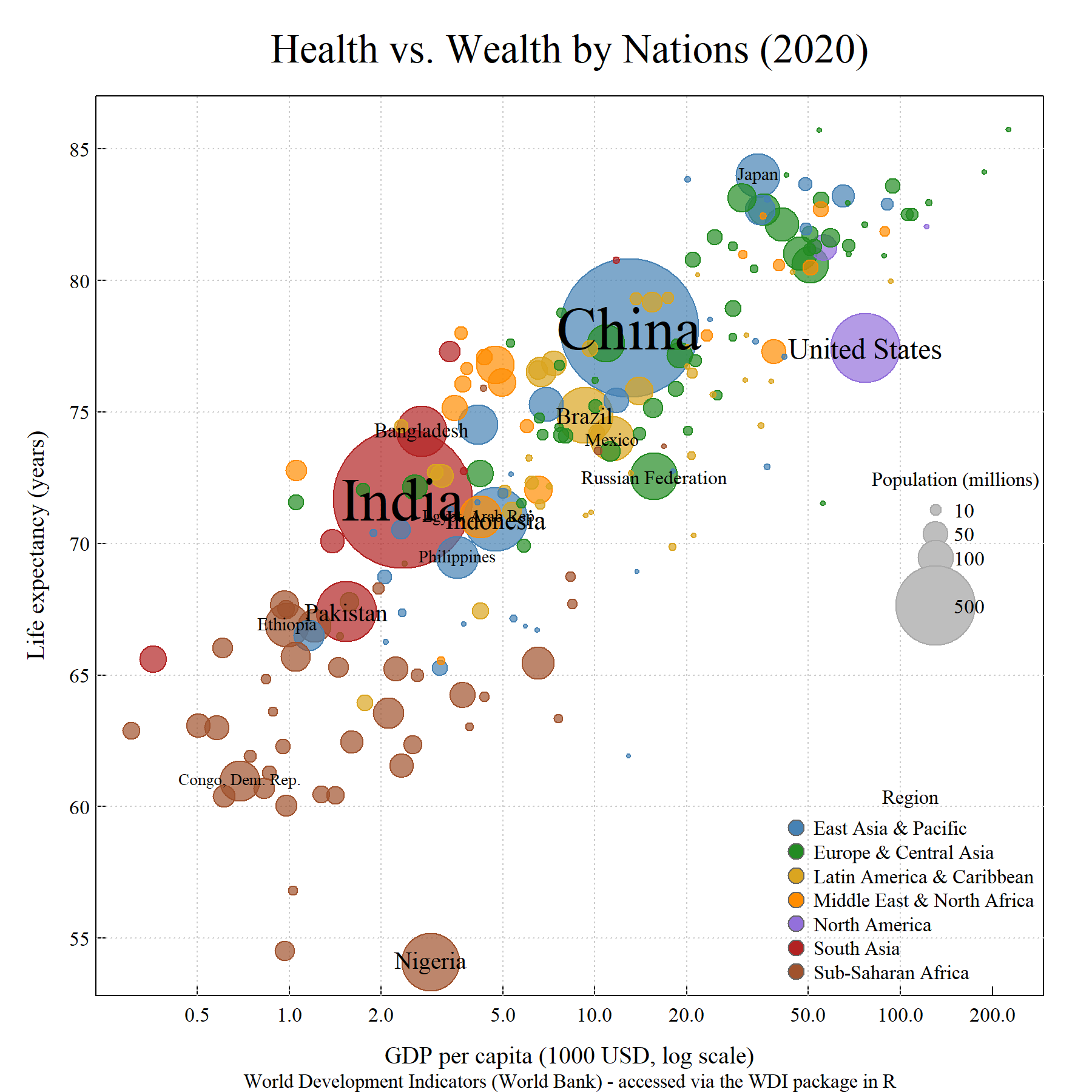 ] --- ## Example 2: The Prompt .pull-left[ > Convert to ggplot. [[*paste code*]] **The broader point:** This translation would take an experienced ggplot user 1–2 hours of Stack Overflow. Claude does it in ~3 Wh — less energy than a single complex Google session. **But you still need to understand the result.** ] .pull-right[ <img src="llm-lecture_files/figure-html/unnamed-chunk-2-1.png" alt="" style="display: block; margin: auto;" /> ] --- class: inverse, middle # Summary .Large[ - AI is a **multiplier** — it amplifies what you already know - Use `Claude.ai` with institutional account - **Sonnet is almost always enough** — match the model to the task - **Good prompts** = context + task + constraints + full code - **Iterate small** — one feature at a time, run every response - **You are the QC** — understand what it produces, or you can't fix it - **Environmental cost is real but manageable** — good prompting is also good ecology ]